
HubSpot's Agent CLI, released in public beta this summer, lets AI agents interact directly with your CRM data through a command-line interface. The tool handles bulk operations across contacts, companies, deals, workflows, and pipelines. It's designed for repetitive, scheduled work that runs without a human in the loop. And that's precisely why the , dry-run flag isn't optional.
When you're managing HubSpot workflows through the UI, you get a confirmation dialog before anything destructive happens. With Agent CLI, commands execute as text, sometimes across dozens of workflows simultaneously. Some of those changes can't be undone. Once you delete a workflow, it's gone. The dry run requirement isn't a suggestion; it's a gate. You cannot update or delete a workflow until you've completed a dry run.
The CFO Question Nobody Asks Until It's Too Late
Marketing operations teams have been automating workflows for years. What's different now is the scale of potential damage. An AI agent running bulk operations can touch hundreds of records in seconds. The efficiency gain is real, but so is the risk of a single malformed command wiping out months of pipeline work.
The math here matters. If your average deal value is $50,000 and a botched workflow deletion breaks the nurture sequence for 200 qualified leads, you're looking at potential pipeline exposure in the millions. That's not a technical problem. That's a board-level conversation about operational controls.
Dry run changes the risk profile by inserting a preview step between intent and execution. The command shows you exactly what it would do, then stops. You review the list, confirm it matches your expectations, and only then proceed. It's the same principle behind Terraform's plan-and-apply workflow or the preview modes in Auth0's deploy CLI: show the blast radius before you detonate.
What Dry Run Actually Does
A dry run simulates the operation without modifying any data. For workflow operations in HubSpot's Agent CLI, this means the system returns a list of workflows that would be affected, the specific changes that would be applied, and any dependencies or downstream impacts.
The output is structured, which matters for two reasons. First, you can review it programmatically. If you're running Agent CLI as part of a larger automation, you can parse the dry run output and apply conditional logic before proceeding. Second, you have an audit trail. The dry run output becomes documentation of what you intended to do, which is useful when someone asks why a particular workflow was modified six months from now.
HubSpot's documentation recommends starting with reporting, summaries, and analysis tasks before moving to operations that modify data. That's sound advice. Build confidence with read-only operations first. Understand how the agent interprets your prompts. Then graduate to write operations with dry run as your safety net.
The Pattern Applies Beyond HubSpot
The dry run pattern isn't unique to HubSpot. It's becoming standard practice across any CLI that touches production data. Auth0's deploy CLI uses the same approach for tenant configuration changes, with options for preview-only mode in CI pipelines and interactive review for manual deployments. The principle is identical: show the plan, get confirmation, then execute.
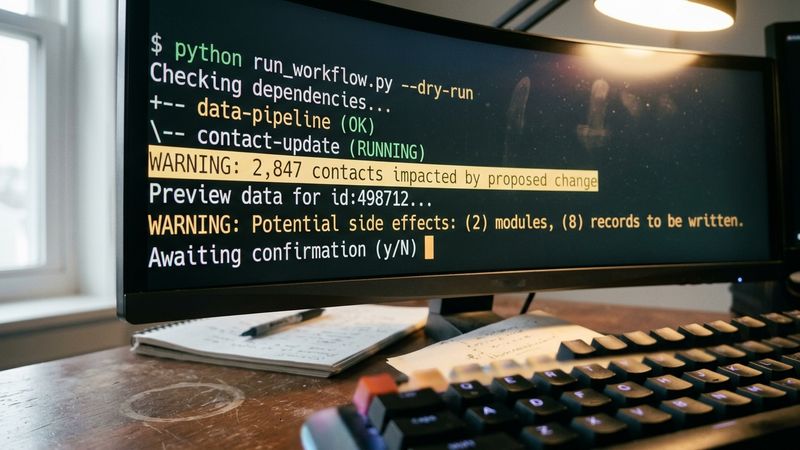
For marketing operations teams, this pattern should inform how you evaluate any automation tool that touches your CRM or marketing automation platform. Ask the vendor: does this tool support dry run or preview mode for destructive operations? If the answer is no, you're accepting risk that doesn't need to exist.
The same logic applies to bulk record updates, merges, and deletes. Any operation that can't be easily reversed should have a preview step. If your current tooling doesn't support this, you're one bad command away from a very uncomfortable conversation with your CFO.
Building the Habit
The operational discipline here is straightforward. Before any bulk operation that modifies or deletes data, run the command with , dry-run first. Review the output. Confirm it matches your intent. Then execute the actual operation.
For teams using Agent CLI with AI coding agents like Claude Code or OpenAI Codex, this means building the dry run step into your prompts. Don't ask the agent to "delete all workflows tagged 'deprecated'." Ask it to "show me what would happen if we deleted all workflows tagged 'deprecated'." Review the output. Then issue the execution command.
HubSpot's community announcement includes example prompts for common use cases: finding incomplete records, summarizing pipeline activity, preparing account reviews. Notice that the examples emphasize analysis and reporting before modification. That's not accidental. It's a deliberate onboarding path that builds familiarity with the tool before you're trusted with destructive operations.
The Pilot Checklist
If you're evaluating Agent CLI for your marketing operations:
- Start in a sandbox account. HubSpot Enterprise accounts can create standard sandboxes that mirror production pipelines, properties, and workflows. Test there first.
- Run read-only operations for at least two weeks before attempting any write operations. Build confidence in how the agent interprets your prompts.
- Document your dry run outputs. They become your audit trail and your rollback reference if something goes wrong.
The efficiency gains from AI-powered bulk operations are real. So are the risks. Dry run is the control that lets you capture the upside while limiting the downside. Use it every time, without exception. The workflow you save might be the one that's driving your pipeline.


